I see here some great setups! Nice work.
Here is mine:
The only thing I don't like from my setup is the keyboard and that's why I decided to buy this one productz.com/en/ducky-mecha-mini/p... . It has some great reviews, and it's not expensive.
Box for home use, usually squeeze a laptop in there somewhere with a bit of shuffling around. Else I end up sitting on the couch with just my laptop. dev-to-uploads.s3.amazonaws.com/i/...
Got some love when I posted this on Reddit.
Rocking dual curved 32 inch 4K displays + X1 Extreme Gen 2 with 15.6 inch OLED display + Lenovo Dock
Except for the battery life of the laptop, I couldn't be happier. Links are amazon links
Monitors
I ordered and tested 7 different monitors from Amazon and surprisingly settled on the cheapest of the bunch. They are Philips 328E1CA.
I didn't even know Philips made monitors but after researching turns out it was one only two curved 32 inch 4Ks, with VESA mounting holes, available. And, upon further research I discovered they make their own panels. People complain a lot about the Samsung panels which are used by the only other competitor in 32 inch 4K curved.. the MSI MAG321CURV.
Also, I didn't think I wanted 4K. Originally I was looking at 2K monitors because things are bigger on screen without having to scale. Conventional wisdom states native resolution is supposed to be more crisp than a scaled resolution. I DID NOT find this to be the case, especially for coding/web browsing where the primary activity is reading text. I run these with 200% scaling and they're GREAT; way easier to read with amazingly crisp text compared to a 2K screen running at native resolution. I even tried the 49 inch 2K Samsung at one point and didn't like it nearly as much as the Philips.
Mount
I originally had this cheap dual monitor mount for my monitors after upgrading to larger curved displays I didn't like the way it looked and I couldn't push my desk all the wall. So I upgraded to two Jarvis single arm mounts that come from the sides instead of behind. It turned out awesome.
For the laptop I wanted something back from the desk and inline with the monitors but also low to the desktop. I tried and returned a few options. Nothing off the shelf really allows for having the arm further back but not off to the side. SO... long story longer... I got the idea to attach the original cheaper dual monitor mount upside down on my desk and flip the arm around. Then I bought a separate tray to sit the laptop on.
Hallo!! after a while, are you still happy with the setup? I am thinking of upgrading my 2 dell 2k to the ones you have. did you have any problems or concerns at all?
PHP Developer and before that I was a Sys Admin for small business working with Microsoft Servers (RDS and HyperV) and before that I was a Lighting/Technical Director for a large nightclub...
Recent focus: Web development, maintenance, devops, performance, security and vendor management in a high-volume, cloud-hosted Wordpress + WooCommerce environment with third-party integrations.


Latest comments (67)
I see here some great setups! Nice work.
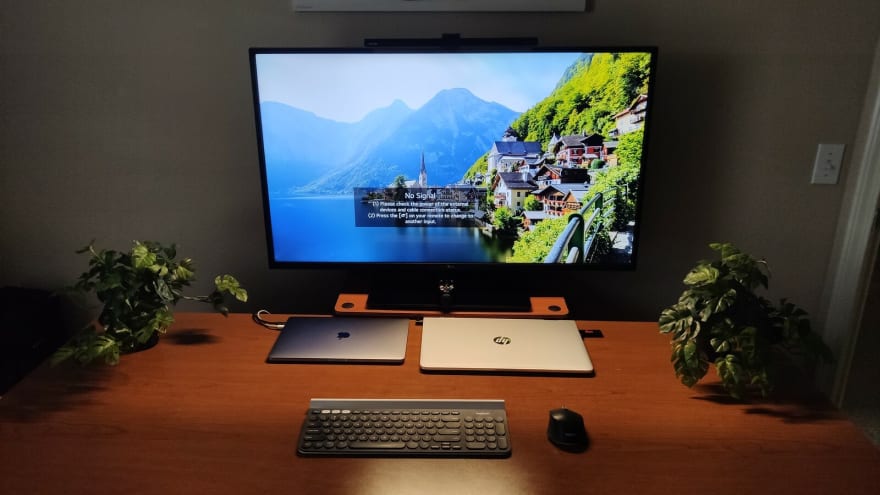
Here is mine:
The only thing I don't like from my setup is the keyboard and that's why I decided to buy this one productz.com/en/ducky-mecha-mini/p... . It has some great reviews, and it's not expensive.
Leds, leds everywhere
Box for home use, usually squeeze a laptop in there somewhere with a bit of shuffling around. Else I end up sitting on the couch with just my laptop.
dev-to-uploads.s3.amazonaws.com/i/...
Got some love when I posted this on Reddit.
Rocking dual curved 32 inch 4K displays + X1 Extreme Gen 2 with 15.6 inch OLED display + Lenovo Dock
Except for the battery life of the laptop, I couldn't be happier.
Links are amazon links
Monitors
I ordered and tested 7 different monitors from Amazon and surprisingly settled on the cheapest of the bunch. They are Philips 328E1CA.
I didn't even know Philips made monitors but after researching turns out it was one only two curved 32 inch 4Ks, with VESA mounting holes, available. And, upon further research I discovered they make their own panels. People complain a lot about the Samsung panels which are used by the only other competitor in 32 inch 4K curved.. the MSI MAG321CURV.
You can see side-by-side specs here. By most measures the MSI should be better but I liked the Philips.
Also, I didn't think I wanted 4K. Originally I was looking at 2K monitors because things are bigger on screen without having to scale. Conventional wisdom states native resolution is supposed to be more crisp than a scaled resolution. I DID NOT find this to be the case, especially for coding/web browsing where the primary activity is reading text. I run these with 200% scaling and they're GREAT; way easier to read with amazingly crisp text compared to a 2K screen running at native resolution. I even tried the 49 inch 2K Samsung at one point and didn't like it nearly as much as the Philips.
Mount
I originally had this cheap dual monitor mount for my monitors after upgrading to larger curved displays I didn't like the way it looked and I couldn't push my desk all the wall. So I upgraded to two Jarvis single arm mounts that come from the sides instead of behind. It turned out awesome.
For the laptop I wanted something back from the desk and inline with the monitors but also low to the desktop. I tried and returned a few options. Nothing off the shelf really allows for having the arm further back but not off to the side. SO... long story longer... I got the idea to attach the original cheaper dual monitor mount upside down on my desk and flip the arm around. Then I bought a separate tray to sit the laptop on.
It turned out perfect! Here's a pic of what it looks like from behind. The pole is meant to be on the top of the desk.
Dock
The dock is the ThinkPad Thunderbolt 3 Workstation Dock (230W/170W). Which I believe is the only dock that supports this laptop.
Hallo!! after a while, are you still happy with the setup? I am thinking of upgrading my 2 dell 2k to the ones you have. did you have any problems or concerns at all?
thanks!
Still love it! Use it every day. I have some family and friends that have the same setup now. 😀
Nice setup! What OS on the TP?
Thanks. 👍
Windows 10 Pro (with WSL 2 + Ubuntu when necessary).
I mostly do React Native dev.
I just changed to dual 27 inch monitors. And the machine is running ubuntu 20.04, an 8 core AMD 8370, 32 Gb RAM with 3 SSD's with ZFS. I built it.
I don't work from home, I live at my office.
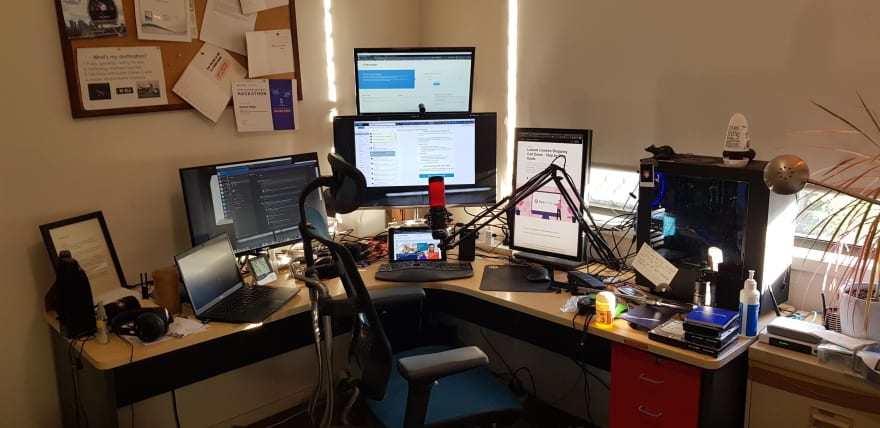
Not pictured: the other 6 cats.
Pretending I'm outside by setting my desktop backgrounds as shots from past hiking trips 🌳
dev-to-uploads.s3.amazonaws.com/i/...
Is that an alien banana? Love it!!!
Almost as cool, it is a banana squid!
dev-to-uploads.s3.amazonaws.com/i/...
Remodeled it a bit. Traded in my slow as hell iMac 5K with Fusion Drive for a 2018 Mac Mini which is soooooo fast. I've waited so long 😭 😂
Pretty simple but I like it (:
dev-to-uploads.s3.amazonaws.com/i/...
Some comments may only be visible to logged-in visitors. Sign in to view all comments.