


Ever think of creating a webpage using HTML with a simple Header and Footer? That's easy, right?
But what if your application grows and you need to repeat the same code for the header and footer 5, 10, or say 15 times?

Remember the DRY (Don't Repeat Yourself) principle of software development.

With the introduction of Web Components, it becomes easy to solve this problem and to create reusable HTML components.
In this article, we'll learn about Web Components in-depth, the easiest way to create custom HTML elements.
What are Web Components?
It is a suite of different technologies allowing you to create reusable custom elements — with their functionality encapsulated away from the rest of your code — and utilize them in your web apps.
It consists of three main technologies:
HTML templates : The "template" and "slot"
elements enable you to write markup templates that are not displayed on the rendered page. These can then be reused multiple times as the basis of a custom element's structure.Custom elements : A set of JavaScript APIs that allow you to define custom elements and their behavior, which can then be used as desired in your user interface.
Shadow DOM : A set of JavaScript APIs for attaching an encapsulated "shadow" DOM tree to an element — which is rendered separately from the main document DOM — and controlling associated functionality.
In this article, we'll discuss about the Shadow DOM implementation.
Shadow DOM refers to the ability of the browser to include a subtree of DOM elements into the rendering of a document, but not into the main document DOM tree.
It allows hidden DOM trees to be attached to elements in the regular DOM tree — this shadow DOM tree starts with a shadow root, underneath which can be attached to any elements you want, in the same way as the normal DOM.

There are some terminologies related to shadow DOM :
- Shadow host: The regular DOM node that the shadow DOM is attached to.
- Shadow tree: The DOM tree inside the shadow DOM.
- Shadow boundary: the place where the shadow DOM ends, and the regular DOM begins.
- Shadow root: The root node of the shadow tree.
Let's understand this with a simple example:-
Step 1: Create a Class Definition
To begin with, in our header.js file we define a class called Header, which extends HTMLElement:
class Header extends HTMLElement {
  constructor() {
    // Always call super first in constructor
    super();

    // write element functionality in here
    ...
  }
}
Inside the class definition, we define the element's constructor, which defines all the functionality the element will have when an instance of it is instantiated.
Step 2: Create Shadow Root
We first attach a shadow root to the custom element:
// Create a shadow root
const shadowRoot = this.attachShadow({ mode: 'open' });
There are two options for 'mode' : 'open' * & *'closed'.
mode: open means that you can access the shadow DOM using JavaScript written in the main page context.
If you attach a shadow root to a custom element with *mode: closed * set, you won't be able to access the shadow DOM from the outside — myCustomElem.shadowRoot returns null.
Step 3: Creating the Shadow DOM Structure
Next, we use some DOM manipulation to create the element's internal shadow DOM structure:
const headerTemplate = document.createElement('template');
headerTemplate.innerHTML = `

<div>
    <div class="header">
        <h1> Header - My First Blog on Web Component </h1>
    </div>
</div>`
Step 4: Attaching the shadow DOM to the shadow root
The final step is to attach all the created elements to the shadow root.
connectedCallback runs each time your custom element is inserted into the DOM.
connectedCallback() {
        const shadowRoot = this.attachShadow({ mode: 'closed' });
        shadowRoot.appendChild(headerTemplate.content);
}
Step 5: Styling the shadow DOM
After that we create a style element and populate it with some CSS to style it:
const headerTemplate = document.createElement('template');
headerTemplate.innerHTML = `

<style>
    .header{
        text-align: center;
    }
    h1{
        color: blue;
    }
</style>

<div>
    <div class="header">
        <h1> Header - My First Blog on Web Component </h1>
    </div>
</div>
`
In the above example, we apply a style to the Shadow DOM using a style element, but it is perfectly possible to do it by referencing an external stylesheet from a "link" element instead.
const headerTemplate = document.createElement('template');
headerTemplate.innerHTML = `
<link rel="stylesheet" href="https://maxcdn.bootstrapcdn.com/bootstrap/4.5.0/css/bootstrap.min.css">
<link href="css/style.css" rel="stylesheet">
```
Your resultant *header.js file* will look like this:
```javascript
const headerTemplate = document.createElement('template');
headerTemplate.innerHTML = `
<style>
.header{
text-align: center;
}
h1{
color: blue;
}
</style>
<div>
<div class="header">
<h1> Header - My First Blog on Web Component </h1>
</div>
</div>
`
class Header extends HTMLElement {
constructor() {
// Always call super first in constructor
super();
}
connectedCallback() {
const shadowRoot = this.attachShadow({ mode: 'open' });
shadowRoot.appendChild(headerTemplate.content);
}
}
customElements.define('header-component', Header);
```
**Step 6: Import your component into HTML file**
Create an *index.html* file and add your custom header component to it.
```html
<!DOCTYPE html>
<html lang="en">
<head>
<meta charset="UTF-8">
<meta name="viewport" content="width=device-width, initial-scale=1.0">
<title>Web Components</title>
<script src="header.js"></script>
</head>
<body>
<header-component></header-component>
</body>
</html>
```
Now run index.html in browser:
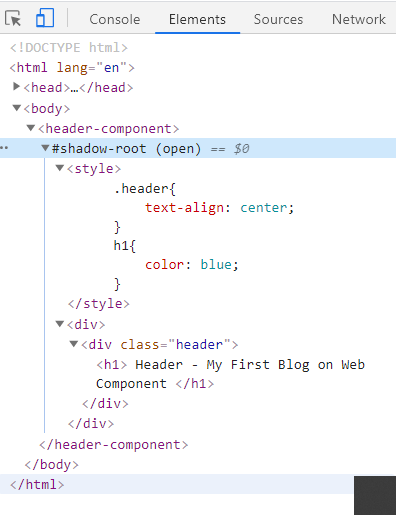
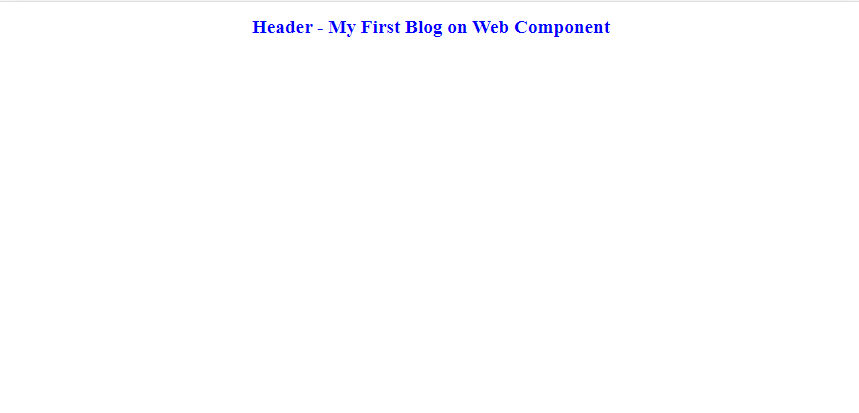
Congrats!! you have created your first custom HTML component.

Thank you for reading. This is the first time that I wrote any blog article. I hope you enjoyed reading it.
Please share it with your network. Don’t forget to leave your comments below.
[](https://www.buymeacoffee.com/anuradha2612)

Latest comments (36)
Hey @anuradha9712

I am also using the web components in my web pages. But I am facing an issue in web components when they load on to the web page. I have notice if I run my code in slow network. First HTML loads then after CSS took place.
Desired Behavior:
I want first CSS load for all of the web components after that HTML should be visible. Can anyone help me out.
Code
this was awesome
I don't understand this line:
// Always call super first in constructor
Is there a limitation in using JS Classes for Web Components?
It's just because the keyword
extends HTMLElementis used. That means you have to callsuper()as well.I invite you to checkout this small component class that give reactive functionality to the standard implementation based in state (avoild re-render all component and only update the specific node when is required).
npmjs.com/package/cuppa-component
Advantages.
Excellent breakdown. One of the most interesting things I've been looking at for the last couple of years is the slow shift to a compiler pattern in JS frameworks. Svelte, Stencil from Ionic and github just came out with one recently called Catalyst that looks a lot like Stencil without JSX on a cursory inspection. Except for Svelte (where it's optional) they compile to web components.
Angular and Vue have options to compile into web components, Salesforce has been using lightning web components since 2016 (I think it was 2016), Red hat is moving the next version of Patternfly to WC, Apple's been using WC in a few places since 2018, the list goes on. I see a lot of comments about how people "don't see it"... But they would have to be actively ignoring it or in <insert top 3 framework here>-only land for that to be true.
Keep in mind, Web components have only been adopted into Firefox since Oct of 2018, and Edge since it went Chromium, so it's still early days for the spec, but it definitely looks like the trend is moving towards web components/native JS sent to the user's browser and ever so slightly away from sending a big framework to act as a runtime. But that shift takes time and articles like this to get the word out!
Web components also have a terrible reputation from around 2015 when the v0 spec was out and polymer and a few other projects we're trying to implement them. It's also where things like "Shadow DOM is bad for SEO" come from. It's outdated info. It got much better with v1 and the new generation of tools like the ones I mentioned plus lit-element and lit-html (the "new" polymer from Google)
"Keep in mind, Web components have only been adopted into Firefox since Oct of 2018, and Edge since it went Chromium, so it's still early days for the spec,"
This is a funny argument.
So something is a JS standard, but a JS standard has to mature like wine or whiskey before you can use it?
Not really an "argument" so much as a signal, or setting expectations. A common argument against using WCs that I've encountered since I started using them back in 2018 was the lack of tools and libraries compared to the current framework ecosystem.
The difference is that those frameworks have had a decade+ of tooling behind them.
The same thing happened when transitioning the ecosystem away from jQuery, as a lot of engineers at the time argued against moving away because of the huge plugin ecosystem and tools like Bootstrap that depended on jQuery.
Just like jQuery could be used inside a framework environment (and still is in some environments to this day), WCs can be used inside the traditional framework environments.
But if people allow that kind of FUD to stop them from adopting new changes to the spec, the ecosystem will never grow, and we'll still be building the same old React applications 20 years from now instead of pushing the discipline further and taking advantage of tools that are natively supported in the browser.
So in a way, from the perspective of adoption and support, my answer is that yes, there is a certain amount of maturing that anything introduced into the JS (or any other language's) ecosystem needs.
Even the spec went through two drafts before adoption, but now that it HAS been adopted, it will take a while for the ecosystem to build.
That said, the difference in support from 2018 (where there was little to none) and today is a pretty significant change, and I expect it to keep growing over the next few years.
But if you think of Web Components as just a language feature...
No one is saying, well... Set and Map have only been possible for N years, so be careful using them...
and no one is NOT using them because there is no extra tooling.
Biggest problem with WCs is that most developers are comparing them to other technologies.
Comparing them to RAVS (React,Angular,Vue,Svelte) is like comparing Set/Map to Redux
And (maybe) an even bigger problem IS the tooling available; the number of "Web Component" libraries is just crazy. Means most people learn A Tool instead of The Technology.... and a fool with a tool, is still a fool (is what we learned from jQuery)
𝘞𝘦𝘣 𝘊𝘰𝘮𝘱𝘰𝘯𝘦𝘯𝘵𝘴 𝘢𝘳𝘦 𝘯𝘦𝘸 𝘑𝘢𝘷𝘢𝘚𝘤𝘳𝘪𝘱𝘵 𝘭𝘢𝘯𝘨𝘶𝘢𝘨𝘦 𝘧𝘦𝘢𝘵𝘶𝘳𝘦𝘴 𝘸𝘪𝘵𝘩 100% 𝘮𝘰𝘥𝘦𝘳𝘯 𝘣𝘳𝘰𝘸𝘴𝘦𝘳 𝘴𝘶𝘱𝘱𝘰𝘳𝘵,
𝘵𝘩𝘦𝘺 𝘢𝘳𝘦 𝘩𝘦𝘳𝘦 𝘵𝘰 𝘴𝘵𝘢𝘺 𝘧𝘰𝘳 𝘢𝘴 𝘭𝘰𝘯𝘨 𝘑𝘢𝘷𝘢𝘚𝘤𝘳𝘪𝘱𝘵 𝘪𝘴 𝘢𝘳𝘰𝘶𝘯𝘥.
Should be the only sentence we write to newbies.
Why can't I just use Reactjs for this?
You can. No one is saying you can't.
bundlephobia.com/result?p=react-do...
But if you do, you'll be shipping 40kb+ of JS over the wire just to do something the browser already comes with built-in.
What's more, "react" usually comes along with a bunch of non-standard extras, and when you inevitably have to rewrite your app down the line for compatibility, you'll be stuck under a mountain of jsx, webpack, and babel cruft.
If you write your app using web components, each element is self-contained and interfaces with the rest of the app using common HTML and DOM. You'll be able to update or change your elements piecemeal, one-by-one. You'll also be able to use your elements across frameworks easily
custom-elements-everywhere.com/
I see!
Thanks
I'd say that learning Web Components it's much easier than learning any new Framework/Library.
I've even made a few myself.
Here is my <switch-component></switch-component>
So basically it's similar to what you can do in reactjs components. But without using reactjs. Though i think reactjs is better for this task.
Yes, but if you like the reactjs concept of fast implementation, don't update the DOM manually and made update automatically only when it is required or for any reason requires use vanilla js, can get advantage of that... Also there is another uses cases:
interesting, but how to inject parameters and content inside the created elements?
Using the DOM
See my post for more info dev.to/bennypowers/lets-build-web-...
And what about SEO? Funny as it is but not practical in real life.
Yup! SEO is quite cool. Though it demands patience & handwork, but I suppose, it rewards in the end, as I have got from here and there! Being a busy mom, I am thinking to raise a few SEO projects!
Google executes JavaScript and has no problem parsing your content even if it's in shadow DOM.
But you don't have to put your content in shadow root, in fact, for many applications, it's better to keep content in the light DOM of the document.
Ok - Google reads and executes js, but Bing and other crawlers mostly not, so as i really want this to be prod solution i think it is just a cool experiment or usable only if website or app will have traffic ONLY from google (and this is far from reality).
Bing executes JS. Bing crawls shadow DOM content, just like Google does.
Executing js is not the same as reading content corectly - i don't remember where, but i saw tests and bing readed component, but without semantic - if i'm incorrect about this, someone please correct me.
Would be nice if you show here tests with all the biggest search engines showing, this method is not impacting seo at all.
Thanks in advance.
Example? I ask this to see if there is anything special to do when you are not using shadow
I have other doubt it would not have been better to put the template in a method of the Header class, which returns the element in question, especially to have an order, do it as it is now does not give me any help to organize the code. And it's as if it was the same code of all life, even worse because it puts it in a shadow, to which I guarantee you Google doesn't have access.
I wouldn't take that guarantee. Google search absolutely, 100%, without a doubt DOES read content in shadow DOM. Bing as well.
If you're using a
<template>element, then the template should either be in module scope or a static member of the class. If you make it an instance field or method, you will lose the performance benefit of only parsing the HTML once.And this is in fact how FASTElement does it. LitElement however lets you define a
rendermethod on the instance, which will perhaps be more suitable for you.Some comments may only be visible to logged-in visitors. Sign in to view all comments.